
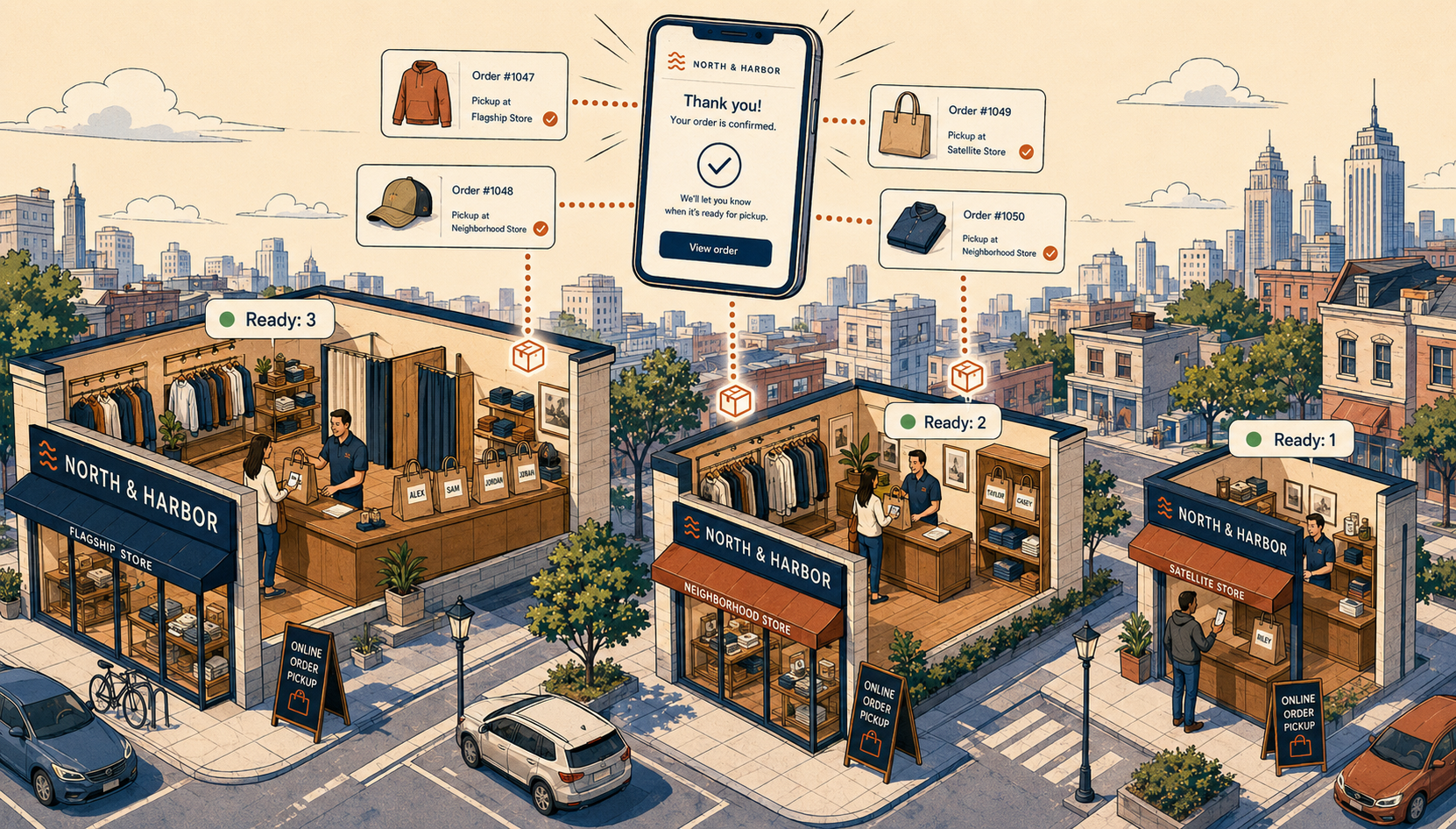
At one store, BOPIS is straightforward. One team, one inventory file, one pickup counter. Everyone in the store learns the workflow within a week, and the shop floor catches most mistakes before they reach a customer.
The moment you add a second store, the math changes. By five stores, you're running the same BOPIS workflow across teams who have never met, with five times the inventory surface area and five times the chances for things to go wrong before a customer arrives. By twenty stores, BOPIS becomes an operations program, not a feature.
Most retailers expect the scaling challenge to be technical — order routing, software complexity, system load. In practice, that's not where the real pain is. The two problems that actually scale with store count are far more mundane: keeping teams trained and consistent, and keeping inventory accurate.
What multi-location BOPIS isn't (a quick clarification)
Before diving in, one piece of common confusion worth addressing.
When people hear "BOPIS at multiple stores," they often picture a system deciding which store should fulfill an order. That's how ship-from-store works, but it's not how BOPIS works in most cases. In the standard BOPIS flow, the shopper picks the location at checkout based on what each store has in stock at that moment. The system isn't routing anything — the customer has already chosen Store 3 because Store 3 is the one with their size in stock and closest to home.
(There are exceptions: some retailers with stores clustered very close together turn off per-location inventory validation, let shoppers pick any nearby location, and transfer stock between stores after the order is placed. This pattern creates much larger operational challenges, and Mortar doesn't currently support it.)
Order routing logic — proximity rules, priority hierarchies, capacity thresholds — applies to ship-from-store, where the customer doesn't pick the fulfillment location. We'll cover ship-from-store separately. For BOPIS, the interesting questions live elsewhere.
Problem 1: Consistency across teams
When a customer orders for pickup at Store 3, they don't think of themselves as ordering "from your Store 3 team." They ordered from your brand. They expect the same speed, the same packaging, the same friendly hand-off they'd get at any of your other locations.
Delivering that consistency across five or ten or thirty teams is the part of multi-location BOPIS that nobody warns you about. The work breaks down into:
- Pick speed. How quickly does an order get picked once it lands? At one store, it's whoever's free. At ten stores, you need an expectation — and a way to know which stores meet it.
- Pick accuracy. Right SKU, right variant, right size. Mistakes compound: one wrong pick at Store 3 means a refund and a frustrated customer who then doubts every BOPIS order they place with you.
- Hold-shelf hygiene. Pickups sitting on shelves for days because nobody chased the customer. Bags that get sold accidentally because they weren't labeled. Items returned to the floor before the customer arrived.
- Customer communication at hand-off. The script when a customer walks in. The ID check (or not). The "thanks for shopping with us" (or not).
- What to do when something is off. Half the order is missing — what does the staff do? Different stores will do different things unless you've trained them to do the same thing.
Most of this comes down to training and process. Software can't manage your team's behavior. But software can make the right behavior the easiest behavior — which is most of how training actually sticks.
Where Mortar's per-location ShipStation integration changes this
ShipStation is the fulfillment tool most multi-store retailers already use for shipped orders. The standard ShipStation integration isn't location aware — all orders are displayed in the same queue, requiring additional manual parsing by each team.
Mortar's integration is location aware. That awareness allows a separate ShipStation order view for each store, so only the orders and splits that require fulfillment from that store are visible. Each store's BOPIS and ship-from-store orders flow into the same focused fulfillment queue the team already uses every day.
The reason this matters for training: store teams aren't learning multiple tools or performing additional manual steps. They see BOPIS orders alongside their shipping orders, pick them with the same pick lists, print the same labels and pick tickets, and hand them off using the same process. The "training" is mostly "this is BOPIS, this is shipping — same workflow, here's how to tell them apart."
For multi-location retailers, this is a much bigger deal than it sounds. The training overhead of running multiple processes across thirty stores — getting every team comfortable with multiple interfaces, troubleshooting login issues for every shift, building muscle memory across hundreds of staff — is the largest hidden cost of most BOPIS rollouts. Per-location ShipStation skips that cost.
It also gives you, the operator, a single place to see fulfillment performance across stores: pick times, accuracy, queue depth, cancellations. You can see which store is falling behind and act on it.
Problem 2: Inventory accuracy at scale
The other thing that scales with store count is inventory drift.
Our BOPIS realtime inventory article covers why real-time sync matters and how batch sync causes overselling. Everything there is necessary at multi-location scale — and not sufficient.
Here's why. Real-time sync solves the timing problem: when a sale happens at Store 3, Shopify reflects it within seconds. But it doesn't solve the physical problem. If the system says Store 3 has 3 units and reality says Store 3 has 1 unit, no amount of sync speed will save you. The customer orders for pickup, the staff goes to look, the item isn't there, and the order gets canceled.
In a single-store operation, physical inventory drift is a constant background nuisance — but you and your one team can catch most of it during the week. Across many stores, that drift compounds:
- More receiving means more chances for receiving errors.
- More returns means more chances for returns processed at the wrong status.
- More damage means more chances for damaged stock that never gets written off.
- More cycle counts means more drift between counts, and more inconsistency in count quality across stores.
- More staff means more chances for items moved, mis-shelved, or lost in the back room.
The visible failure is the canceled BOPIS order — or, worse, the customer experiencing that cancellation at the pickup counter. The cause sits weeks earlier, somewhere in operations, at a store the corporate team may have never visited.
What helps:
- Tighter receiving and damage write-off processes, so the gap between system inventory and physical inventory shrinks at every store.
- More frequent, smaller cycle counts, especially for high-velocity SKUs.
- Safety stock thresholds that reserve the last units at each store to protect both in-store demand and against inventory inaccuracies, so BOPIS doesn't sell the unit you weren't quite sure was really there.
- A way to verify inventory at pick time, before the customer is committed to a pickup that may not be fulfillable.
Protecting against order cancellations caused by inventory inaccuracies is what our new app, Holdback, is built for. Holdback pulls the final units of a SKU out of availability and prompts store staff to confirm those units are physically there before a pickup can be committed. It's a just-in-time accuracy check at the moment it matters, designed to catch the inventory drift failures that real-time sync can't see — because if the system is wrong about whether the unit exists at all, syncing doesn't help.
Under the hood, Holdback tracks safety stock at a per-variant, per-location level — not a blanket threshold applied across your whole catalog. That distinction matters at scale. A flat "reserve the last 2 units at every store" rule over-protects slow-moving SKUs (locking up units that don't need protecting) and under-protects fast-moving variants (letting drift still slip through). Tracking per-variant and per-location optimizes that trade-off automatically — the right number of units is held at the right store for the right SKU, so you maximize availability without sacrificing fulfillment reliability.
Holdback is currently in review with Shopify and will be available soon. We'll update this post with a link once it's live. In the meantime, the practical playbook for inventory accuracy at scale is real-time sync plus safety stock thresholds, paired with ongoing investment in the upstream processes — receiving, write-offs, cycle counts — that keep physical and system inventory honest.
The smaller edge cases that still matter
Beyond the two big problems, a few operational situations are worth designing for explicitly:
Reserve and hold. When a BOPIS order is placed, the inventory is committed — held off the sellable pool until the customer picks up or the reservation expires. Most big retailers run 48-72 hour holds with automated reminders. Without this, you get the worst customer experience in BOPIS: a customer who drove to the store to find their item was sold to someone else. But Shopify treats BOPIS as a committed sale — no automatic release or refund unless the customer comes in-store to resolve it. That means you've got to follow up with the customer if they don't show up to claim the order.
Temporary store closures. Weather, staffing, holiday hours. The system needs to flag affected orders proactively and offer alternatives — not let the customer drive to a closed store.
Returns at a different location. A customer picks up at Store A, lives near Store B, and wants to return at Store B. In modern setups this should just work — the return is processed at Store B, inventory is added to Store B, and the Shopify order is updated accordingly. Other integrations force returns back to the original store or to mail, or may not support them at all, which is a meaningful friction tax on multi-location BOPIS.
None of these are the headline problem at scale, but each creates memorable customer service incidents when handled badly.
How Mortar fits in at multi-location scale
Mortar's multi-location architecture is built around the real challenges of running BOPIS across many stores. For retailers running Lightspeed Retail (R-Series), Lightspeed Retail (X-Series), or Heartland Retail with Shopify:
- Per-location ShipStation integration so each store team uses a single fulfillment tool for all fulfillments — cutting training and rollout friction for BOPIS and ship-from-store across every store.
- Real-time inventory sync that propagates POS sales, adjustments, and returns to Shopify within seconds, so the per-location stock customers see at checkout matches what's actually on the shelf.
- Safety stock thresholds per location that reserve a configurable buffer for in-store demand, so BOPIS doesn't gut your walk-in inventory.
- Multi-location visibility for the customer, so BOPIS choices reflect actual availability per store rather than aggregate stock.
- Multiple Shopify sites per POS account, useful when you run different storefronts (retail, wholesale, international) off the same physical inventory.
- Returns reconciled across locations, so a return at any store updates inventory and the original Shopify order correctly.
And none of this requires replacing your POS. Mortar adds multi-location BOPIS capability on top of the Lightspeed or Heartland POS your stores already use. For multi-location retailers, this matters more than at any other scale — a POS change ripples across every store, multiplying retraining cost, data migration risk, and operational disruption. An integration layer is the only way to add real-time, multi-location BOPIS capability without that ripple.
See multi-location BOPIS capabilities →
Where to go next
If you're earlier in your BOPIS journey:
- What is BOPIS? — the basics.
- BOPIS implementation guide — setup walkthrough.
- Real-time inventory accuracy — the technical foundation.
Ready to see what multi-location BOPIS looks like with Mortar?
Start a free trial → or book a demo →
Add reach without adding overhead. Mortar runs your store and your online store as one operation. Add channels while you keep working in the POS you already use. Sell everywhere your customers are — without the work multiplying. Your store, everywhere. See how Mortar works · Why Mortar